Stop Answering DMs. Start Making Sales.

Your Business deserves a Store


Create your own store, add your products, share your link and let customers order without blowing up your DMs. Your online store, orders, payments, inventory, invoices and customers — all in one place.

The perfect upgrade your business needs.

Food / Drinks / Beverages Store

%

Free to get started

Easy steps to launch

/7

Your store stays open

Link

All your products

Makes sales even
while you sleep

Whether you're selling clothes, wigs, beauty products, food, electronics or anything in between, Fondz gives you a simple way to put your business online.

Your Own Store

Your products deserve more than a WhatsApp status. Create a beautiful online store with your own brand, products and prices.

Zero DM Drama

Let customers browse your products, pick what they want and place their order — without the usual 21 questions in your DM.

Get Paid Faster

No more: “Send account number.” “Payment sent.” “Have you seen it?” Give your customers a simple way to pay when they order.

Keep Stock in Check

See what's available, what's running low and what's sold out, so you always know what's available before the day's orders start coming in.

Orders, Deliveries, Sorted.

Every order in one place. See what's been ordered, what's paid, what's pending, and what needs to be delivered — to who and to where.

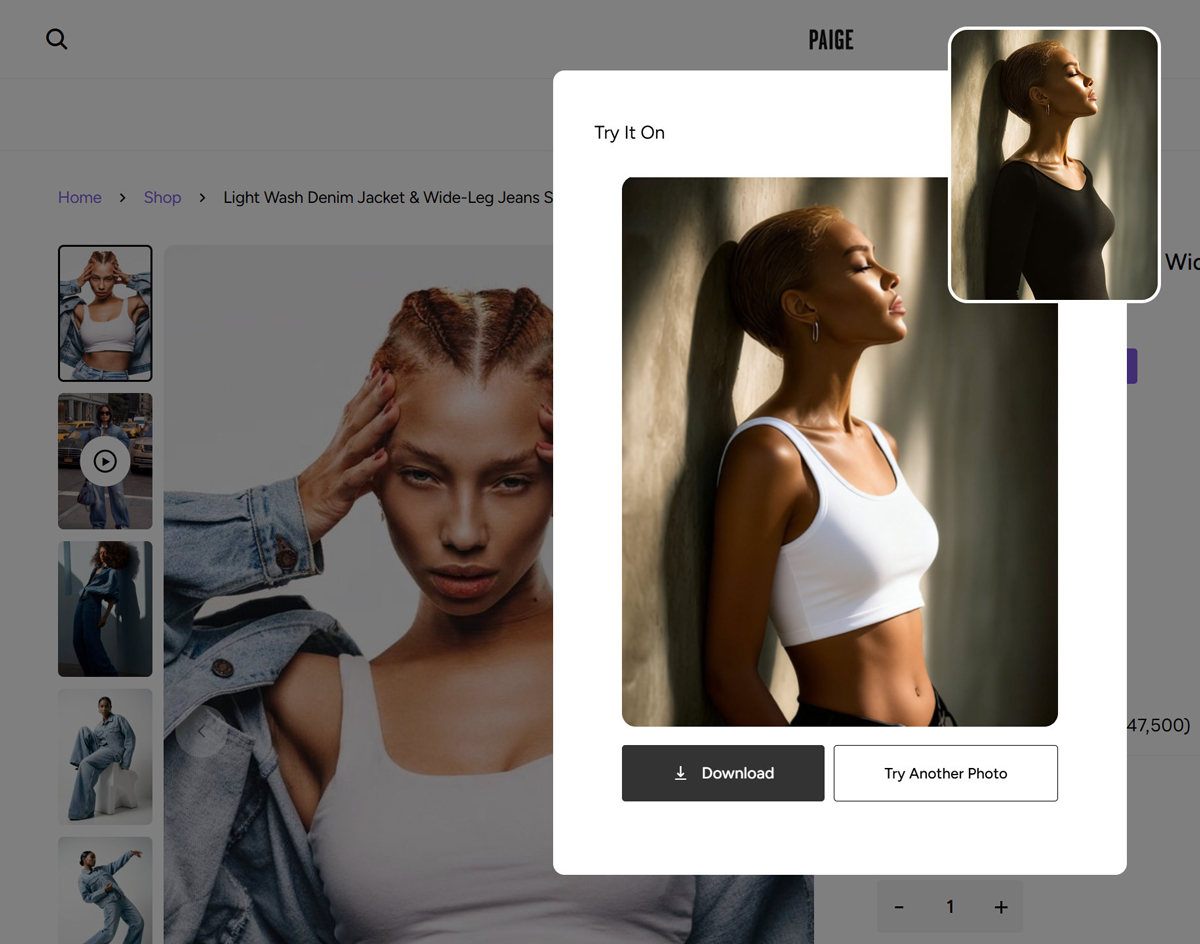
Let customers try before they buy

Give your shoppers a fun and exciting way to explore your products. Our AI-Powered Virtual Try-On lets your customers upload and photo see your actual products on themselves before they buy — Turn "Will this look good on me" into "I want this!" in a mattter of seconds.

Give your business a place to sell.

Your customers shouldn't have to slide in your DMs to ask for product prices or what's in stock. Create a FREE online store that looks like your brand, add your products, share your link and let customers shop... anytime.

No coding.
No complicated setup.
No more sending product photos and prices one DM at a time.

1 Link. All your Products. Ready to Go!

Tap for Live Demo
Clothing / Fashion Store

Never miss a sale

Your Fondz store is always open. Customers can browse your products, place orders and pay while you're working, sleeping, at the market, or just taking a much-needed break.

Your store goes where you go

Share your store link on Instagram, WhatsApp, TikTok or anywhere else your customers hang out. One link, your whole store.

Never get caught out of stock

Fondz keeps an eye on your inventory and emails you when a product is running low. When something hits zero, it's automatically marked “Sold Out” on your store.

Let customers do the shopping

Customers can browse your products, choose what they want and place their orders without waiting for you to reply.

Tap for Live Demo
Gadgets / Gaming Store

Get your store running in 4 easy steps.

No tech skills. No complicated setup. Just create your store, add your products and start sharing your link.

1. Create your FREE Store

Pick your store name, add your brand details and make your store yours. That's it! No coding required.

2. Add your Products

Upload your products, photos, prices and descriptions. Got products? Great. Put them on your store.

3. Share your Store Link

Drop your link on Instagram, WhatsApp, TikTok or wherever your customers find you. One link. Your whole store.

4. Start selling

Customers browse, select what they want and place their orders. You get the order. You make the sale. Fondz handles the rest.

Okay, so... I have
some Questions

Is it really free to create a store?

Yep. You can create your Fondz store for free, add your products and start sharing your store link with customers.

Do I need a website or coding skills?

Nope. Not at all. Fondz handles the technical stuff. Just create your store, add your products and you're ready to go.

How do my customers place orders?

Your customers simply visit your store, browse your products, select what they want and place their order. No more endless DMs just to take an order.

Can my customers pay online?

Yes. Your customers can pay for their orders online through your Fondz store, making it easier to get paid and keep track of your sales.

Can I sell anything on Fondz?

You can sell a wide range of products and services on Fondz, as long as they comply with our terms and applicable laws.

Can I share my store on Instagram and WhatsApp?

Absolutely! Your Fondz store comes with a unique shareable link you can put on your Instagram bio, WhatsApp, TikTok, Facebook — basically anywhere your customers are.

Can I manage my orders and inventory on Fondz?

Yep. Fondz gives you tools to manage your orders and keep track of your inventory, so you can spend less time juggling spreadsheets and chats.

How do I withdraw my earnings from Fondz?

Head to your Withdrawals page, enter an amount (minimum ₦5,000, up to your available balance) and submit. Your payout is sent straight to your verified bank account — no manual approval needed on your end.

When does my money actually become available to withdraw?

Earnings are added to your Available Balance only after an order is delivered and the customer confirms it on their end. Until then, the money stays held on the platform — this gives the customer a short window to flag an issue with what arrived before the funds are released to you.

What happens if a customer rejects an order after delivery?

If a customer rejects a delivered order, that order's earnings stay held on the platform rather than moving to your Available Balance. The funds remain there until the rejection is resolved — this is what allows Fondz to process a refund to the customer if the resolution calls for one.

Do I need to add a bank account before I can withdraw?

Yes. Add and verify your bank account under Bank Setup first — Fondz confirms it with your bank before your first withdrawal. Until it's verified, the withdraw button stays disabled so you're never left waiting on a payout that can't be delivered.

How long does a withdrawal take to arrive?

Withdrawals are instant. You can track the status of every withdrawal — pending, processing, or completed — right from your Withdrawals page.

What if I have more questions?

You can Chat with Support on WhatsApp at anytime.

Take your store to the next level

Create it for free. Add your products, share your link and start selling!